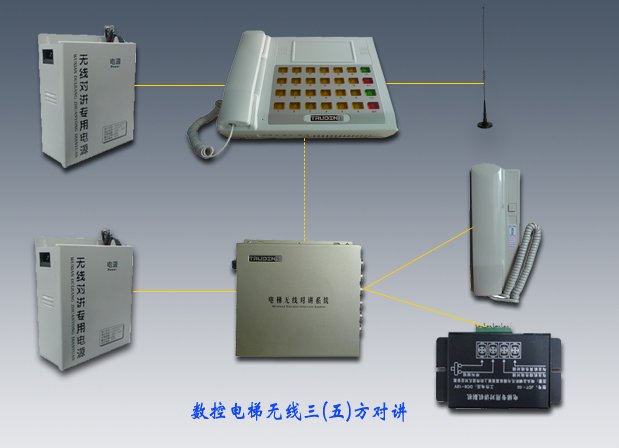
TS-959 Elevator Wireless Controlling System
1. Talk with each extension separately
2. Seperately receive answer from each extension
3. Wireless Two-way voice communication
4. Press one button and broadcast through all extensions
5. Automatically inspect extension's working status.
6. Signal instruction for the extension that is paging
7. Anti paging interruption
8. Signal instruction when in voice communication status
9. Control talking process
10. Strong ability of anti screening
11. Special UPS charger
Main Technical Parameter
Frequency Range: 409-----410(China)
Channel Capacity: 20
channel Spacing : 25 KHZ
Modulation Type: FM
Working Method: Simplex,semi duplex
Antenna Impedance: 50¦¸
Working Voltage: 12.8V
Earth Method : Cathode Earth
Working Temperature: -10--+55
RF Power Output: Low:5W High:10W
Clutter Wave Radiation : ¡Ü-60dB
Application:
Single point to multi points comunication such as used in elevator, by apartment management, or among building stuff on site etc.
Features & Advantage:
1. Easily mounted inside the elevator communication system without changing its original layout;
2. Reliably receive audio signal;
3. Work stably;
4. Up to date digital coding & decoding technology; each system has its sole code; no interference among systems
Product Description:
Complete product is composed by controlling system and extension intercom in the elevator.
Each controlling system has 15 or 30 paging buttons
Working Principle
1. When someone pushes the bell button in the elevator, the extension will record and transfer it to the controlling machine.
2. After receiving the information from the extension, the controlling machine will send out a long alarm sound and then repeat the received record. After the record is over, there is a tick-tock. At this moment, push the corresponding button and speak. If releasing the button, it is in receiving status. Receiving time is 30s. If nobody operates, it will be shut down automatically. After it receives the record from the extension, the controlling machine predominates the communication.
3. After the controlling machine predominates the communication, push the button on the controlling machine. If the red light turns on, speak through the microphone, then release the button, and receive the reply from the extension. The reply will be stopped within 5 seconds by the tick-tock. The communication between the controlling machine and extension will proceed through the repeated action. The person in the elevation does nothing just talk to the speaker.
Installation of Elevator Wireless Intercom controlling system:
1. Place the controlling machine onto the horizontal table so as to operate conveniently
2. Place the special UPS charger appropriately, and connect it with the power, and switch on the instruction light. If the red light is on, it means output of 12V voltage; and if the orange light is on, it means fast charging. If the orange light flashes, it means it is in the process of devulcanization. If the green light flashes, it means it has finished charging. If the green light is on, it means it has already been charged and ready for operation. (The charging time for the first time is 24 hours.)
3. Connect the antenna with the controlling machine and place it vertically 1 meter away from controlling machine.
4. Insert the microphone into the hole.
5. Connect the 12V power cord with the controlling machine. When the green light
turns on the machine is ready for operation.
Warning: When changing the DC fuse, the specification (current value) must be the same. The current value of changed wire should not be higher than the original.
Installation of extension:
1. Take off the glass shade and install the extension by four screws in the elevator controlling room wherever is convenient for operation and 2 meters above the ground and has good ventilation. Finally put on the glass shade.
2. Place the special UPS charger appropriately, and connect with the power, and switch on the instruction light. If the red light is on, it means output of 12V voltage; and if the orange light is on, it means fast charging. If the orange light flashes, it means it is in the process of devulcanization. If the green light flashes, it means it has finished charging. If the green light is on, it means it has already been charged and ready for operation. (The charging time for the first time is 24 hours.)
3. Connect the antenna with the controlling machine and place it vertically 1 meter away from controlling machine.
4. Connect the extension work interface with the bell button, speaker and microphone in the elevator car through the existing cable. Connection method is as follows:
Red line + Bell button
Black line - Earth
Green line + Audio input
Blue line - Audio input
Yellow line + Audio output
White line - Earth
5. Connection method with the original wire paging system:
Red line + Bell button
Black line - Earth
Green line + Audio input
Yellow line + Audio output
Step 1. Connect directly the black, green and yellow line with corresponding work interface of original wire paging system;
Step 2. Cut off the connection of the original intercom system and the bell button in the elevator car;
Step 3. Connect the red and black line with the bell button in the elevator car through the existing cable of the elevator
6. Connect the 12V power cord with the extension. When the green light turns on the machine is ready for operation.
Warning: When changing the DC fuse, the specification (current value) must be the same. The current value of changed wire should not be higher than the original.